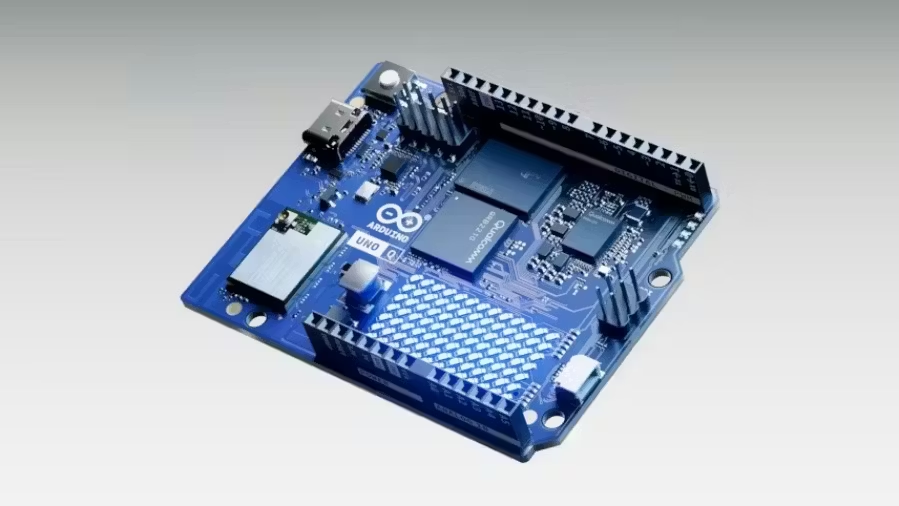
In a rapidly evolving world driven by AI, electronics, and IoT innovation, the need for a development board that delivers power, flexibility, and ease of use has never In a rapidly evolving world driven by AI, electronics, and IoT innovation, the need for a development board that delivers power, flexibility, and ease of use has never been greater. Enter the Arduino UNO Q — a next-generation single-board computer designed to supercharge your projects and push the boundaries of what’s possible. Meet UNO Q: your go-to tool from blink to think! The very first UNO board helped spark the maker movement 20 years ago. Now, we’re thrilled to introduce UNO Q. A Linux Debian-capable microprocessor powered by the Qualcomm Dragonwing™ QRB2210 processor, with AI and graphic acceleration, quad-core performance and camera/audio/display support. A real-time STM32U585 microcontroller, perfect for precise control and responsiveness. With this combination of high-performance computing and control, and a long list of advanced specs that add features, not complexity, UNO Q is designed to be a go-to tool for anyone. It’s accessible, versatile, and ready for lifelong learning and innovation, from getting an LED to blink to building your first AI application. And there’s more! The new Arduino App Lab: UNO Q is also the first Arduino board to work with Arduino App Lab – a brand-new integrated development environment that unifies the journey across real-time OS, Linux, Python, and AI. That means you get: Faster and easier development through a single interface that bridges different domains into one seamless experience. Ready-to-use Arduino Apps and Bricks to get you started right away. Integration with Edge Impulse’s platform to build and fine-tune AI models using real-world data for object identification, anomaly detection, sound recognition, and much more. Curious what makes UNO Q a true game-changer under the hood? Scroll down for a deep dive into the powerful specs, performance benchmarks, and how it stacks up against other boards — this is where innovation meets engineering. The Arduino UNO Q combines high-performance computing with real-time control, making it perfect for AI, IoT, and robotics enthusiasts. Other popular boards like the Raspberry Pi 5 (2 GB) and Arduino Uno R4 WiFi serve different purposes, so it’s important to know how Arduino UNO Q stands out. Key Features of Arduino UNO Q 1. Dual-Brain Architecture The UNO Q’s hybrid design gives you the best of both worlds: Real-time STM32U585 MCU for low-latency, deterministic control of sensors, motors, and robotics applications. Qualcomm Dragonwing QRB2210 MPU for running Linux-based applications, AI models, and high-level computation. This architecture ensures your robotics, IoT, and AI projects run smoothly, without compromises between speed and precision. 2. Built-in AI and Edge Computing The Arduino UNO Q comes with preloaded AI models for tasks like object detection, sound recognition, and anomaly detection. Coupled with GPU acceleration and dual ISP cameras, it’s perfect for machine vision, smart sensors, and AI-driven automation. 3. Arduino Ecosystem Compatibility UNO Q retains the classic Arduino UNO form factor, making it compatible with: UNO shields Qwiic connectors for Modulino nodes Third-party Arduino modules This ensures seamless expansion and easy integration with existing Arduino projects. 4. Unified Development with Arduino App Lab The Arduino App Lab preloaded on the UNO Q unifies development across Linux and real-time OS. You can: Write Arduino Sketches Code in Python Use containerized AI models All in a single interface, dramatically reducing development complexity. Preloaded AI models for object detection, sound recognition, and anomaly detection 5. Advanced Connectivity and I/O Wi-Fi 5 (2.4/5 GHz) and Bluetooth 5.1 USB-C port for power, video, and peripheral connections LED matrix (8×13) and RGB LEDs for visual feedback High-speed headers and Qwiic connector for advanced peripheral expansion 6. Technical Specifications of Arduino UNO Q ComponentSpecificationProcessor (MPU)Qualcomm Dragonwing™ QRB2210, Quad-core Cortex-A53 @ 2.0 GHzMicrocontroller (MCU)STM32U585, Cortex-M33 upto 160 MHzRAM2 GB LPDDR4 (Note - 4GB variant will be launched by year-end )Storage16 GB eMMCConnectivityWi-Fi 5, Bluetooth 5.1, USB-C, QwiicExtra FeaturesLED Matrix, RGB LEDs, classic Arduino headersOSLinux Debian (MPU), Zephyr OS (MCU) 7. Quick Comparison of Arduino UNO Q vs Raspberry Pi 5 (2 GB) FeaturesArduino UNO QRaspberry Pi 5 (2 GB)ProcessorQualcomm Dragonwing™ QRB2210, Quad-core Cortex-A53 @ 2.0 GHz STM32U585 Cortex-M33 upto 160 MHzQuad-core Cortex-A76 @ 2.4 GHzRAM2 GB LPDDR4 (Note - 4GB variant will be launched by year-end )2 GB LPDDR4XStorage16 GB eMMCmicroSD cardReal-Time ControlMCU handles deterministic tasks LimitedConnectivityWi-Fi 5, Bluetooth 5.1, USB-C, QwiicWi-Fi 5, Bluetooth 5.0, USB 3.0/2.0, Gigabit EthernetBest ForRobotics, AI at the edge, IoTDesktop computing, AI experiments, multimediaProgrammingArduino IDE, Python, App LabPython, C/C++, Linux apps UNO Q excels in real-time, AI-driven projects, while Pi 5 is for compute-heavy desktop and multimedia applications. 8. Arduino UNO Q vs Arduino UNO R4 WiFi FeatureArduino UNO QArduino UNO R4 WiFiProcessorDragonwing QRB2210 MPU + STM32U585 MCURenesas RA4M1 (Cortex-M4 @ 48 MHz)RAM2 GB LPDDR4 (Note - 4GB variant will be launched by year-end )16 KB SRAMStorage16 GB eMMC256 KB FlashAI/MLPreloaded AI models Not PreloadedConnectivityWi-Fi 5, Bluetooth 5.1, USB-C, QwiicWi-Fi, USB-C, GPIO headersProgrammingArduino IDE, Python, App LabArduino IDE onlyBest ForAdvanced IoT, AI, roboticsBasic IoT, embedded projects 9. Advanced Technical Specifications – Arduino UNO Q The Arduino UNO Q is engineered for next-generation projects, combining raw processing power. 9.1 Core Architecture: Microprocessor (MPU): Qualcomm® Dragonwing QRB2210: Quad-core Arm® Cortex-A53 @ 2.0 GHz Adreno GPU 3D graphics accelerator Dual ISP: Supports up to dual 13 MP or single 25 MP cameras @ 30 fps 9.2 Microcontroller (MCU): STM32U585 Arm Cortex -M33 @ up to 160 MHz 2 MB Flash memory 786 KB SRAM 9.3 Memory & Storage RAM: 2 GB LPDDR4 (Note - 4GB variant will be launched by year-end ) Storage: 16 GB eMMC (built-in – no SD card required) 9.4 Connectivity: Wi-Fi® 5 (2.4/5 GHz) with onboard antenna Bluetooth® 5.1 with onboard antenna USB-C port: Power delivery (5 VDC, max 3 A) Host/device role switching and video output Peripheral support for keyboard, mouse, microphones, or cameras via dongle 9.5 Interfaces & Expansion: I/O Interfaces: I²C/I³C, SPI, PWM, CAN, UART, PSSI, GPIO, JTAG, ADC Video Output: USB-C and MIPI DSI (via JMEDIA header) Audio: Microphone IN, Headphone OUT, and Line OUT (JMISC header) 9.6 Expansion Options: High-speed headers for advanced peripherals (vision, audio, display) Classic UNO headers for legacy shields Qwiic connector (3.3V, I²C) for plug-and-play Modulino® nodes 8×13 Blue LED Matrix for visual feedback and display control 9.7 Operating Systems MPU OS: Linux Debian OS (with upstream support) MCU OS: Arduino Core on Zephyr RTOS Containerization: Supports Docker and Docker Compose for modular deployments 9.8 Development Environment: Preloaded Arduino App Lab: Unified IDE for Arduino Sketches, Python® scripts, and containerized AI models Supported Host OS for App Lab: Windows 10 or later (64-bit) macOS 11 or later (64-bit) Linux Ubuntu 22.04+ and Debian Trixie (64-bit) 9.9 Physical Specifications Dimensions: 68.85 mm × 53.34 mm (classic UNO form factor) User Controls & Indicators: 4× RGB user-controllable LEDs 1× User push-button JCTL: MPU remote debug connector 10. Why Choose Arduino UNO Q? In essence, the Arduino UNO Q is more than just a development board — it’s a powerful hybrid computing platform designed to bring AI, real-time control, and rapid prototyping together in one unified ecosystem. The Arduino Uno Q is ideal for anyone looking to: Prototype smart robotics and AI-powered IoT devices Real-time robotics & sensor control AI-powered IoT projects at the edge Unified platform for Arduino Sketches and Python Seamless integration with the Arduino ecosystem With its dual-brain architecture, preloaded AI models, and Arduino ecosystem support, the Uno Q accelerates development and reduces the complexity of advanced embedded systems. Compared to Raspberry Pi 5, UNO Q provides deterministic control and lower power usage. Compared to Uno R4 WiFi, it delivers higher computing power, AI, and Linux support. 11. What is Arduino App Lab? The Arduino App Lab is a next-generation integrated development environment (IDE) designed to deliver a unified experience across Linux® and real-time operating systems (RTOS). Preloaded on the Arduino Uno Q, it bridges the gap between traditional Arduino programming and modern AI-powered development — allowing you to build, test, and deploy complex projects from one seamless interface. 12. Key Features of Arduino App Lab Unified Development Experience With App Lab, developers can write Arduino Sketches, create Python® scripts, and even run containerized AI models — all within the same workspace. This eliminates the need to switch between multiple tools, making development faster and more intuitive. Ready-to-Use Apps and Bricks To help you get started quickly, App Lab includes Arduino Apps — self-contained project examples with everything you need to explore new features. You can also extend functionality using Bricks, pre-built modular components that add plug-and-play capabilities to your project. Built-in AI Power App Lab comes with preloaded AI models that can perform a variety of tasks, such as: Object and human detection Image classification Anomaly detection Sound recognition and keyword spotting These models allow you to bring edge AI to your Arduino projects effortlessly — enabling smarter robotics, predictive maintenance, and intelligent IoT systems right out of the box. In short: Arduino App Lab turns the Uno Q into a complete AI-ready development platform, where creativity meets computation — without complexity. 13. Conclusion: The Arduino UNO Q is a game-changer for makers, educators, and innovators. It merges Arduino simplicity, modern processing power, and real-time control, making it perfect for AI, robotics, and IoT projects. With UNO Q and the all-new Arduino App Lab, development becomes faster, smarter, and more seamless across real-time OS, Linux, Python, and AI. From plug-and-play apps to powerful AI model integration, it’s everything you need to go from idea to innovation — all in one platform.